Run a Node
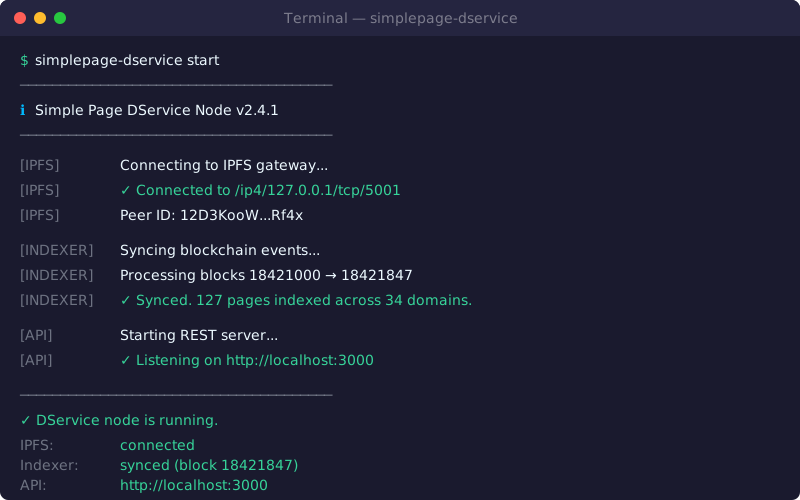
Running a Simple Page Node helps stage content, serve CARs and blocks, index publish history, and sync off-chain drafts.
Prerequisites
- Node.js
24.x. pnpm>=11.3.0.- A running Kubo/IPFS node with its API available.
- An Ethereum RPC endpoint for the target chain.
Installation
pnpm add -g @simplepg/node
Start A Node
Start with defaults:
simplepage-node
Start with explicit IPFS, API, RPC, and chain settings:
simplepage-node \
  --ipfs-api http://localhost:5001 \
  --api-port 3000 \
  --api-host localhost \
  --rpc https://eth.drpc.org \
  --chain-id 1
For Sepolia:
simplepage-node \
  --ipfs-api http://localhost:5001 \
  --api-port 3000 \
  --rpc https://ethereum-sepolia-rpc.publicnode.com \
  --chain-id 11155111
Common Options
| Option | Default | Description |
|---|---|---|
-i, --ipfs-api <url> |
http://localhost:5001 |
Kubo API URL. |
-p, --api-port <number> |
3000 |
HTTP API port. |
-a, --api-host <string> |
localhost |
API bind host. |
-r, --rpc <url> |
http://localhost:8545 |
Ethereum RPC URL. |
-b, --start-block <number> |
unset | Starting block for indexing. |
--block-interval <number> |
500 |
Block batch interval for indexing. |
-c, --chain-id <number> |
1 |
Chain ID. |
-d, --disable-indexing |
false |
Start API/IPFS services without indexing. |
--disable-provide |
false |
Disable IPFS provide on finalization. |
--disable-peer-discovery |
false |
Disable DHT peer discovery and ref sync discovery. |
--tls-key <path> |
unset | TLS private key path. |
--tls-cert <path> |
unset | TLS certificate path. |
--log-level <level> |
info |
Stdout log level. |
--log-dir <path> |
./logs |
Log directory. |
--silent |
false |
Disable console logging. |
Run simplepage-node --help for the current list.
List Management
Allow and block lists are local node policy. They control which domains your node indexes or excludes.
simplepage-node allow-list show
simplepage-node allow-list add example.eth
simplepage-node allow-list rm example.eth

simplepage-node block-list show
simplepage-node block-list add spam.eth
simplepage-node block-list rm spam.eth
Operational Commands
Inspect or reset indexing-related data:
simplepage-node indexer-data show
simplepage-node indexer-data reset
List failed finalized pins:
simplepage-node failed-pins
API
When the node starts, the API is available at the configured host and port.
Useful endpoints:
/docs- Swagger UI./openapi.json- OpenAPI schema./info- version information./page,/file,/history- content and history access./refs/:ensName,/capabilities/:ensName- draft and agent workflows.
See API for endpoint details.
Kubo Notes
For public operation, configure Kubo for reliable peer connectivity and enough storage for the domains you intend to pin. If you expose your Simple Page Node publicly, put it behind TLS or a reverse proxy and consider rate limits, logging, and abuse policy.
Recommended Kubo configuration tips:
provide.strategy: pinning+mfs+unique
Import.FastProvideDAG: true
These settings make Kubo provide pinned, MFS, and unique blocks, and speed up providing newly imported DAGs.
Why Run A Node?
- More nodes improve content availability.
- You can publish and retrieve through your own infrastructure.
- You can enforce your own allow/block policy.
- You help sync history, refs, capabilities, and finalized content.
If you want to run a public node for others, join the Matrix room: #simplepage:stigmergic.org.