Web3 Forms
Web3 Forms let you embed interactive smart contract interfaces directly in your markdown pages. Type a web3:// link, and Simple Page turns it into a working form — with labeled inputs, decimal scaling, and wallet integration — right inside your site.
No JavaScript. No React components. Just a URL in an image tag.
How It Works
Embed a Web3 Form by writing a web3:// URI as a markdown image source. The alt text becomes the form title:

When a visitor opens your page, Simple Page renders this as an interactive form. Read-only calls return data instantly. Transactions prompt the visitor's wallet for a signature.
Examples
Read Contract State
Read-only calls execute immediately with no wallet required. This example reads a USDC balance:
Markdown:
&labels=(Account)&decimals=(,6))
Result:
The form shows a single input field labeled "Account." Enter any Ethereum address and the result is displayed with 6-decimal scaling (USDC uses 6 decimals).
Send a Transaction
Set mode=tx to create a form that sends a transaction. The visitor's wallet will prompt for a signature.
Markdown:
&mode=tx&decimals=(,6))
Result:
The form shows two inputs — Recipient (an address) and Amount (scaled to 6 decimals via decimals=(,6)). When the visitor fills them in and clicks the button, their wallet opens to sign a transfer transaction.
Payable Transactions
For functions that accept ETH (marked payable in Solidity), add value and payable=true:
Markdown:

Result:
The form shows a button with 0.01 ETH attached as the call value. Clicking it prompts the visitor's wallet to sign a payable deposit transaction — here, wrapping ETH into WETH.
URI Format
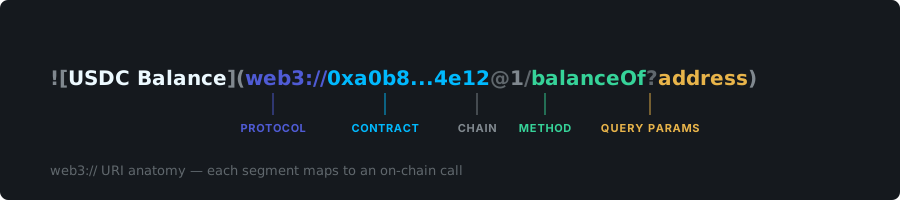
web3://<contract>[:chainId]/<method>[/<type>!<value>...]?[query]
Path Segments
| Segment | Required | Description |
|---|---|---|
contract |
Yes | Ethereum address (0x...) or ENS name |
chainId |
No | Network ID after a colon (e.g., :1 for mainnet, :11155111 for Sepolia) |
method |
Yes | Solidity function name |
type!value |
No | Function arguments — each declares its Solidity type and a default value or placeholder |
Use type!0x for an empty input field (the visitor fills it in). Use type!<value> for a pre-filled default.
Query Parameters
| Parameter | Example | Description |
|---|---|---|
returns |
returns=(uint256) |
Solidity return type for read-only calls. Use returns=() for void. Only used with mode=call |
mode |
mode=tx |
call (default, read-only) or tx (sends a transaction) |
labels |
labels=(Account,Amount) |
Human-readable names for each input field. Count must match the number of arguments |
value |
value=0.01eth |
Adds an ETH value input. Accepts eth suffix or raw wei |
payable |
payable=true |
Marks the call as payable and shows the value field |
decimals |
decimals=(,6) |
Scales numeric inputs and the return value. Positional — use commas to skip arguments |
Decimals — Positional Scaling
The decimals parameter is a comma-separated list, applied in order:
- One entry per function argument
- If a return value exists, add one extra entry at the end
- Use empty slots for arguments that don't need scaling
Example — two arguments + one return: decimals=(,6,18) means:
- First argument: no scaling
- Second argument: divide/multiply by 10^6
- Return value: divide by 10^18
When to Use Web3 Forms
- DAO pages — let members interact with governance contracts directly from the docs
- Token dashboards — show balances, supply, or staking positions
- Payment forms — accept tips, donations, or payments in ETH/tokens
- Developer docs — let readers test contract calls without switching to Etherscan